
Home
XtreamUIPro

Retail & Franchise Networks

One video network across every store

A store channel plays on the screens of every location, the training library reaches each employee, and each franchisee runs its own stores as a partner account — with a node in each region so the video is served close to the shop.

A shop assistant handing paper bags to two customers at the counter.
Photo: Gustavo Fring · Pexels License

The challenges

What a store network has to solve

  • The same message in every store

    Promotions, product film and brand content have to reach the screens of dozens of locations at once and stay consistent from the head office to the till.

  • Training for staff who move around

    New employees at every location need onboarding and product training, and a franchisee should see its own staff and not another's.

  • Stores on ordinary connections

    A shop's internet link is shared with its tills and card terminals, so many screens pulling the same stream from the head office is not sustainable.

How Xtream UI Pro helps

How the platform fits

  • A channel for the screens

    The store channel is a live stream or a looping source in a bouquet; each store's screen plays it through a line with a connection limit.

  • A training library per role

    Onboarding and product training are series and movies in categories by role; packages grant the bouquets of a role to an employee's line.

  • A node per region, a partner account per franchisee

    A node pulls the channel once from the origin and serves the stores of its region; each franchisee is a partner account (reseller) that manages the lines of its own stores.

Platform capabilities

What this industry uses

The capabilities below are the ones this deployment relies on. Each is in the product today; nothing here is planned or on request.

  • Live streaming

    Live channels from your own sources, with EPG, catch-up and timeshift where the source allows, delivered as HLS or MPEG-TS to the apps and boxes your viewers use.

    Origin hub with one upstream per channel · RTMP in and out · ffmpeg transcoding

  • Video on demand

    Movies, series with seasons and episodes, and radio, organised in categories and bouquets, with TMDB metadata and an ingest job that downloads and encodes your sources.

    Signed, time-limited playback links · per-node VOD cache

  • Distributed streaming nodes

    Enrol edge servers from the panel; viewers are routed to a node by load and by country, and the origin serves everybody while no node exists.

    Installed over SSH from the panel · GeoIP routing · heartbeats and traffic stats

  • Subscriber management

    A line is one viewer's access: package, bouquets, expiry, connection limit and output formats, with activation codes, trials and renewals following the same rules everywhere.

    Xtream Codes API, M3U/XMLTV, MAG and Enigma2 portals, web player

  • Partner management

    Delegated accounts with credits, permissions and their own dashboard, up to five levels deep, for the distributors, operators and resellers you work with.

    Groups and permissions · credit ledger · sub-partners

  • Monitoring & operations

    Connection and traffic views, audit logs, Prometheus metrics, alerts by mail, Telegram or webhook, maintenance mode and a built-in update check.

    /metrics endpoints · job queue with leases · encrypted database backups

In the panel

The pages this deployment lives in

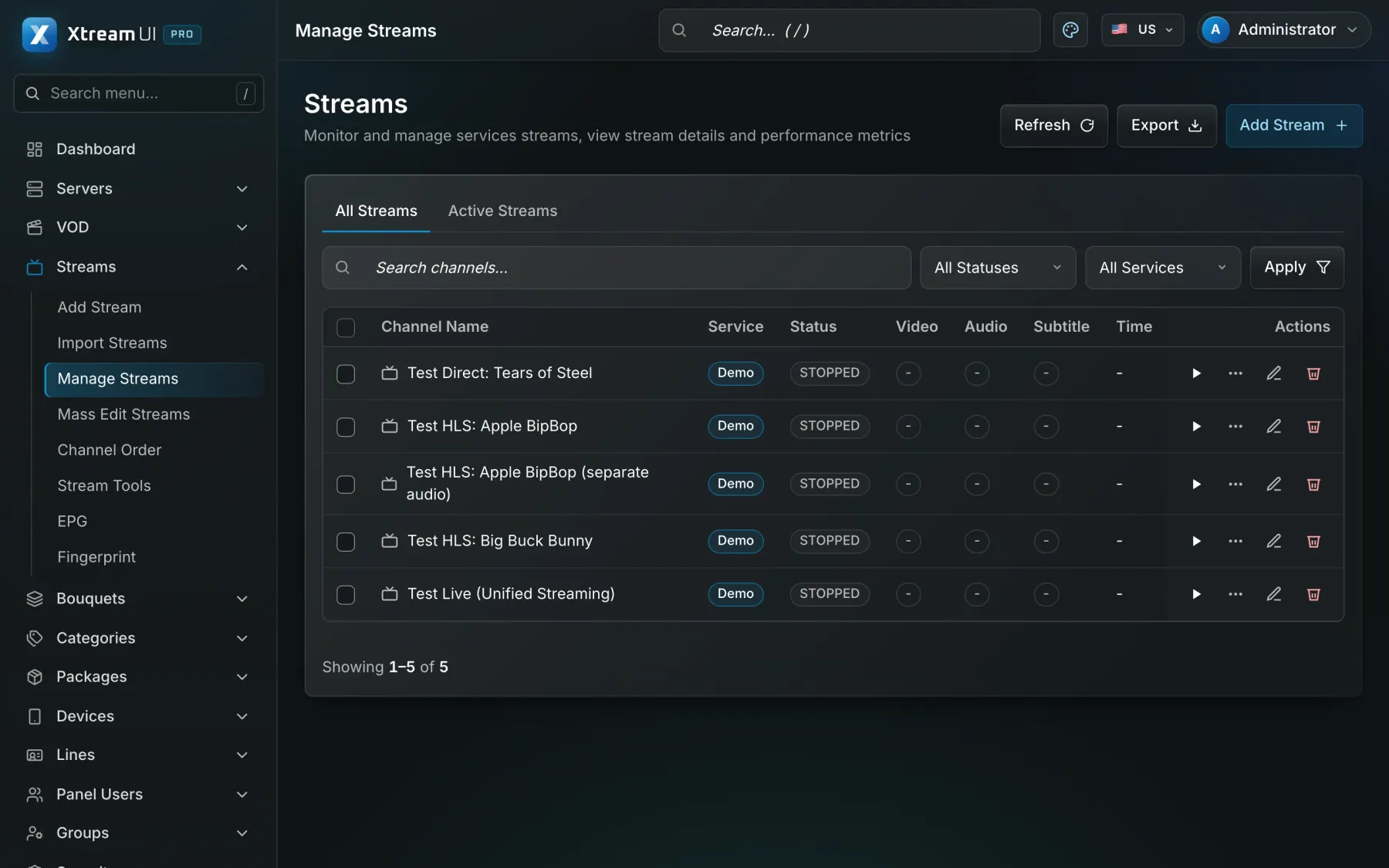
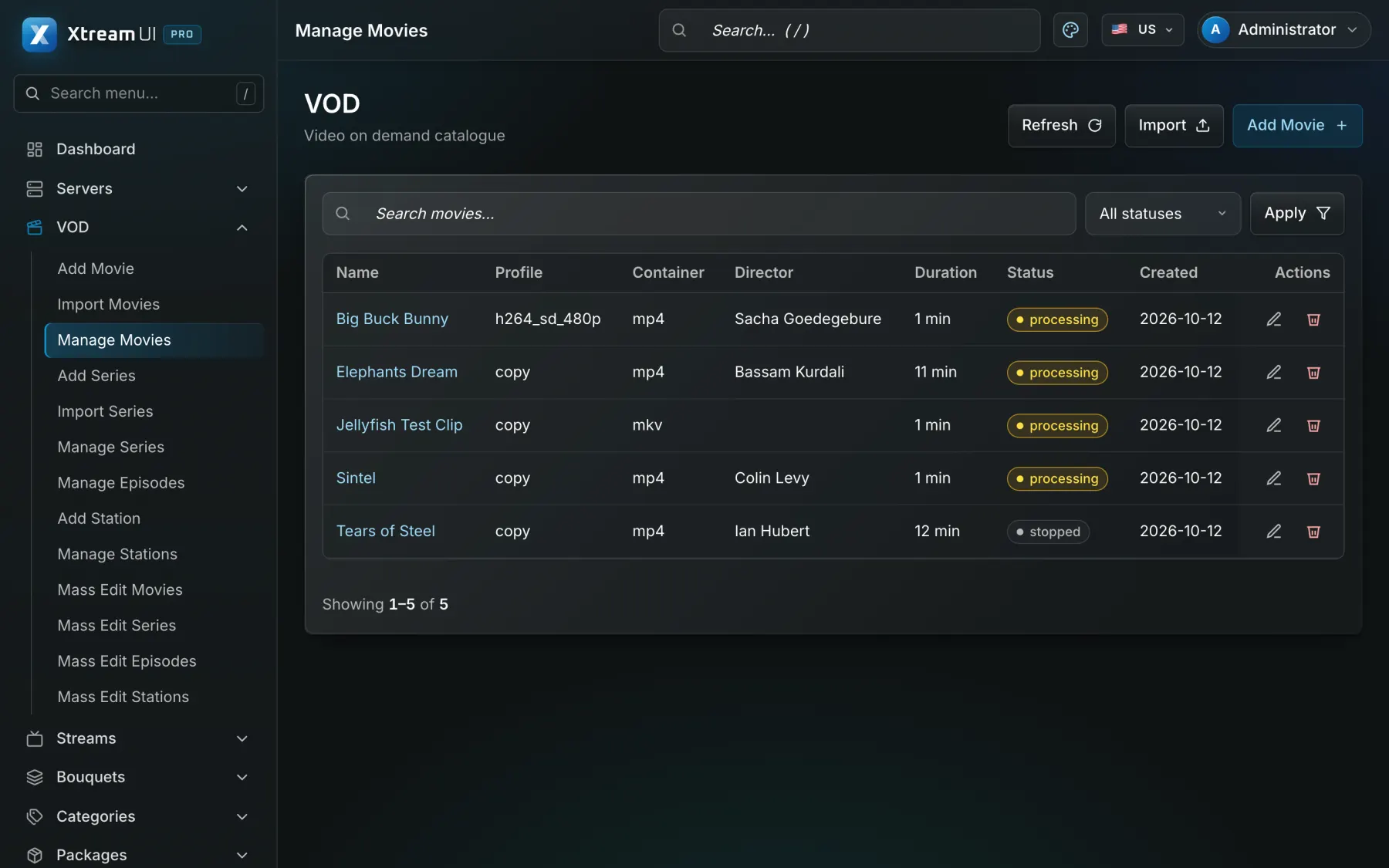
Screenshots of the dashboard of a fresh installation with the sample catalogue. Nothing is mocked up.

The Streams page of the dashboard: the live channels with their status, category, source and output formats.
Live streaming · Origin hub with one upstream per channel · RTMP in and out · ffmpeg transcoding
The Movies page of the dashboard: the films of the catalogue with their category, year and status.
Video on demand · Signed, time-limited playback links · per-node VOD cache

Infrastructure architecture

Example deployment: a forty-store franchise network

A management server at the head office, a node for each region, a store channel on every screen, a training library for staff, and one partner account per franchisee.

Pick a part of the diagram to see what it does.

In a retail deployment the sources are the head office's store channel and the training recordings; the panel holds the channels, the library and the stores' lines; a node per region serves its stores; a franchise-management or HR system connects through the Reseller API and webhooks.

  1. Install at the head office

    The panel, the API, the worker and the origin run on a head-office server; a node is enrolled from Servers for each region that has many stores.

  2. Build the store channel and the library

    The store channel goes into a bouquet for the screens; onboarding and product training go into bouquets per role, with categories per topic.

  3. Add a partner account per franchisee

    Each franchisee is added under Users → add a reseller, with packages for its stores and staff and a credit balance; it creates its own lines.

  4. Limit each store

    Every store line has a connection limit that matches its screens; staff lines have a limit that matches the devices an employee uses.

Configuration mapping

Your concepts, the platform's objects

The platform has no industry-specific objects: a bouquet, a line, a package or a partner account is used as the concept your industry needs. These are conceptual mappings, not native features of that industry.

Step-by-step setup guide

Prerequisites, a node per region, the store channel, the staff training library, a partner account per franchisee, store lines, and troubleshooting, step by step.

Read the setup guide
In your industryOn the platform
Store channel or training collectionBouquet: a named set of channels, films or series that a package grants
Store channelLive channel: a stream with its sources, EPG and output formats
Training and product videoVOD catalogue: movies and series with seasons and episodes, categories and metadata
Store screen or staff accessLine: one access with its package, bouquets, expiry, connection limit and outputs
Franchisee accountPartner account (reseller): a delegated dashboard with credits, permissions and its own lines
Regional nodeStreaming nodes: edge servers enrolled from the panel, one per site or building
Screens or devices per lineMax connections of the line: how many devices may watch at once

Integration considerations

A franchise-management, HR or intranet system connects through the Reseller API (create, renew, disable a line) and webhooks; a commerce connector can bill franchisees if you sell the service on. Encoders connect over RTMP. There is no native integration with a specific retail or point-of-sale product.

Security considerations

A connection limit per line keeps a store's credentials on its own screens; playback links are signed and expire; a line can be bound to a store's address; a franchisee's partner account sees only its own lines; head-office accounts use two-factor sign-in, permission groups and the audit log.

Content rights and licensing

The network needs the rights to the music, the footage and the brand material it plays in the stores and the training; the platform supplies no content and no rights. Standard plans apply.

Content Rights & Acceptable Use

Help centre

Questions from this industry

The questions operators ask before a deployment. The help centre has the general ones.

Help centre
Can each franchisee manage its own stores?

Yes. Each franchisee is a partner account with its own permissions and credits, creating and renewing the lines of its stores. It is a delegated account on the same panel, not a separate installation.

What happens when a store loses its connection?

The screen waits for the stream and resumes when the link is back. For video that must always play, put the store on a node in its region and keep the sources internal.

Does it schedule promotions per store or per hour?

The platform streams channels and the library; it does not schedule signage by store or by hour. A different bouquet per package gives different stores a different channel.