
Home
XtreamUIPro

Live Events

Every stage a channel, every ticket an access

A stage goes out live as a channel, a ticket becomes a line that opens at the event and expires after it, and the venue's own screens are served by a node in the building — on servers you run.

An audience in an auditorium watching a presentation under stage lights.
Photo: Atlantic Ambience · Pexels License

The challenges

What an event has to solve

  • A burst of viewers at a fixed hour

    Thousands of people join when the keynote starts, and the audience is gone a day later; capacity has to be there for the peak and nowhere else.

  • Access that matches the ticket

    A day pass, a three-day pass and a sponsor invitation open different stages, and every access must end when the event does.

  • Screens inside the venue

    The lobby, the overflow room and the press area need the stage feed without depending on the venue's internet link.

How Xtream UI Pro helps

How the platform fits

  • A stage is a live channel

    Each stage's encoder pushes over RTMP to a channel; a bouquet groups the stages a ticket type may watch, and a package carries the access period of that ticket.

  • A ticket is a line

    Lines are created in bulk as activation codes, or by the ticketing system through the Reseller API, with a short expiry and a connection limit per ticket.

  • A node at the venue

    The node in the building takes each stage once from the origin and serves the local screens, so the internet link carries one copy per stage.

Platform capabilities

What this industry uses

The capabilities below are the ones this deployment relies on. Each is in the product today; nothing here is planned or on request.

  • Live streaming

    Live channels from your own sources, with EPG, catch-up and timeshift where the source allows, delivered as HLS or MPEG-TS to the apps and boxes your viewers use.

    Origin hub with one upstream per channel · RTMP in and out · ffmpeg transcoding

  • Distributed streaming nodes

    Enrol edge servers from the panel; viewers are routed to a node by load and by country, and the origin serves everybody while no node exists.

    Installed over SSH from the panel · GeoIP routing · heartbeats and traffic stats

  • Subscriber management

    A line is one viewer's access: package, bouquets, expiry, connection limit and output formats, with activation codes, trials and renewals following the same rules everywhere.

    Xtream Codes API, M3U/XMLTV, MAG and Enigma2 portals, web player

  • API & integrations

    Create, renew and suspend access from your own systems through the Reseller API, receive signed webhooks, and connect billing or commerce platforms with a ready connector.

    Reseller API with idempotent request ids · Admin API keys · 17 connectors

  • Monitoring & operations

    Connection and traffic views, audit logs, Prometheus metrics, alerts by mail, Telegram or webhook, maintenance mode and a built-in update check.

    /metrics endpoints · job queue with leases · encrypted database backups

  • Security & access control

    Two-factor sign-in, sealed secrets at rest, signed playback links bound to the viewer, IP and country rules, connection limits and brute-force protection.

    TOTP · AES-sealed keys · HMAC-signed URLs · GeoIP and ISP rules

In the panel

The pages this deployment lives in

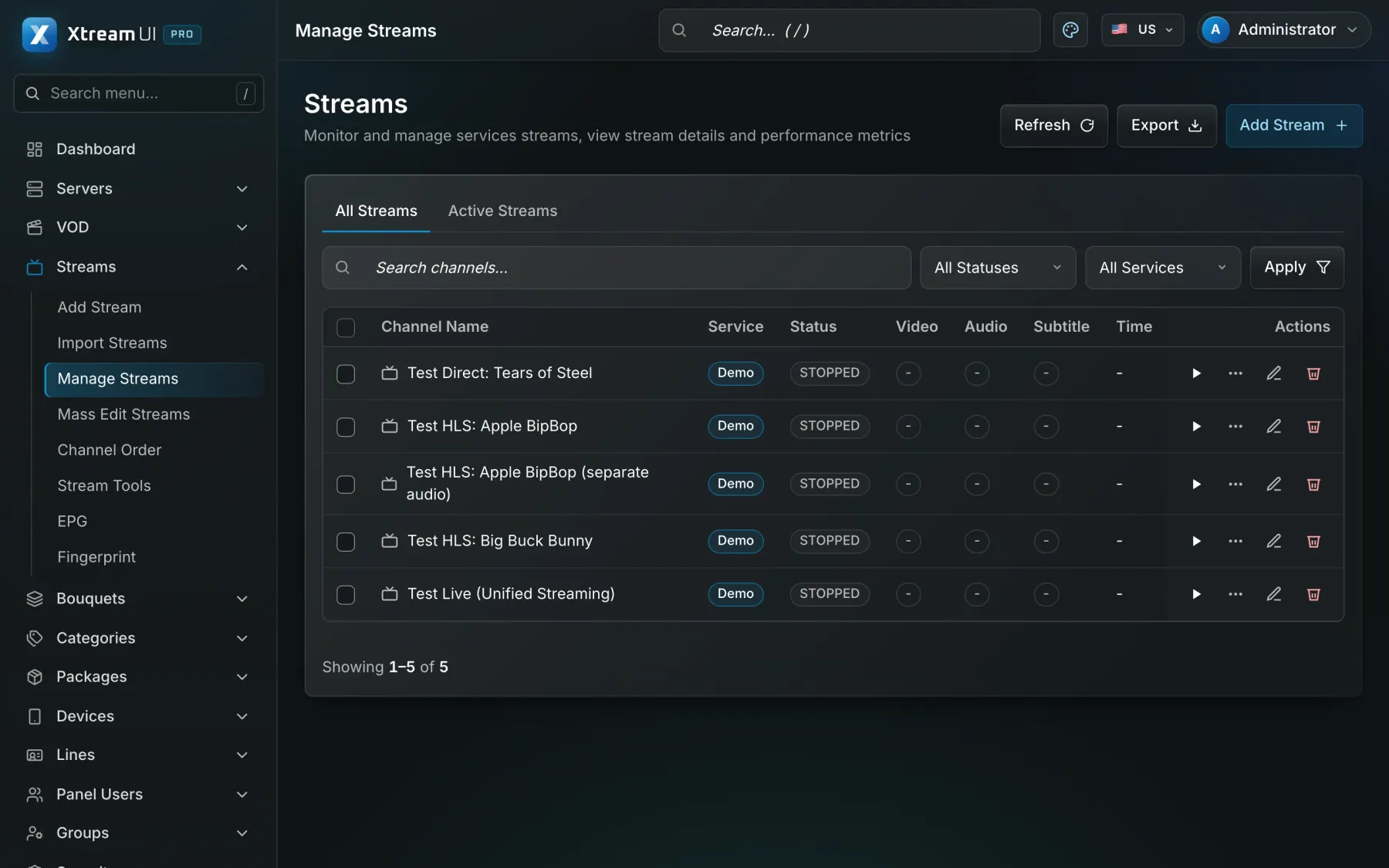
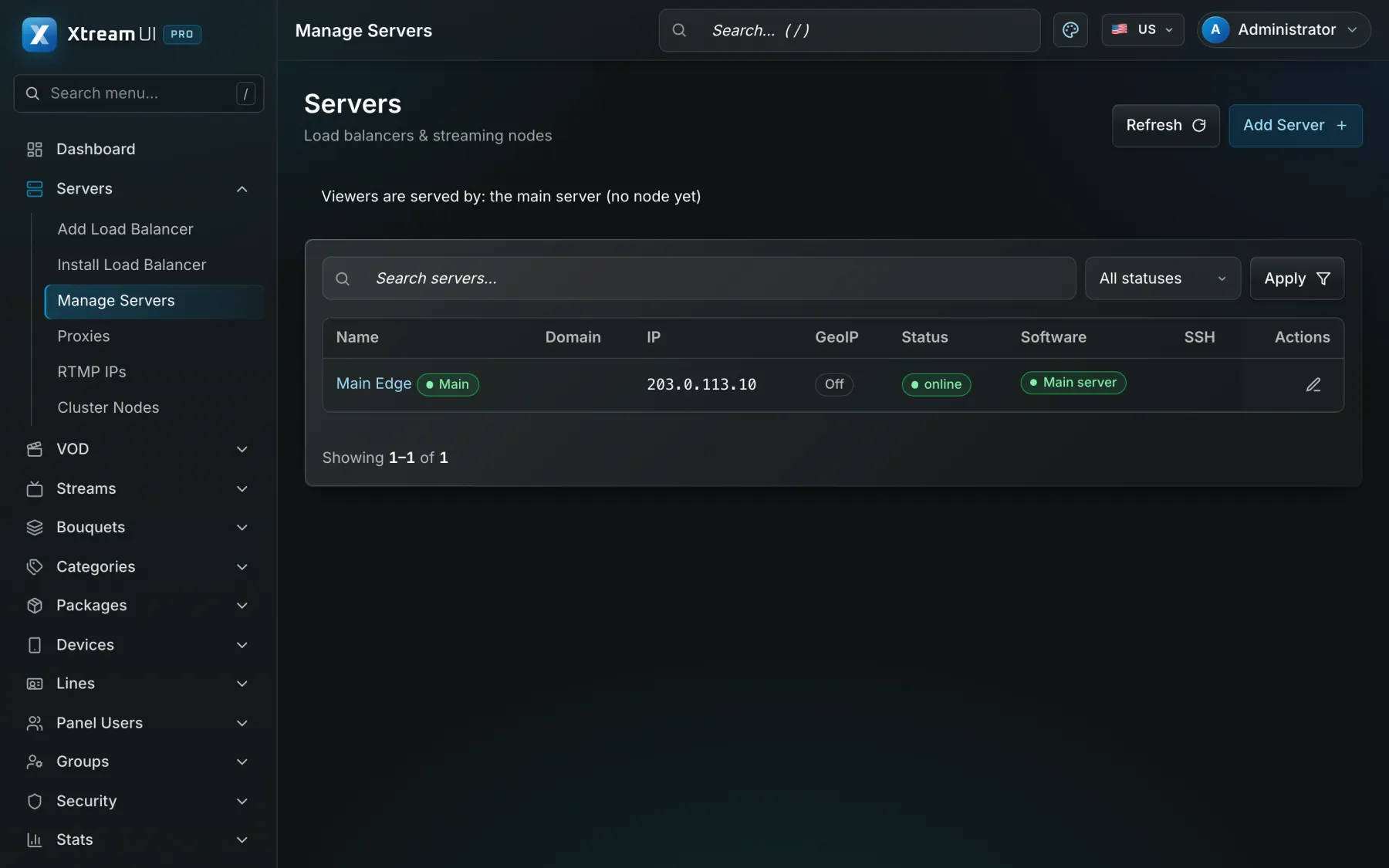
Screenshots of the dashboard of a fresh installation with the sample catalogue. Nothing is mocked up.

The Streams page of the dashboard: the live channels with their status, category, source and output formats.
Live streaming · Origin hub with one upstream per channel · RTMP in and out · ffmpeg transcoding
The Servers page of the dashboard: the main server and the nodes with their status and version.
Distributed streaming nodes · Installed over SSH from the panel · GeoIP routing · heartbeats and traffic stats

Infrastructure architecture

Example deployment: a three-day conference

A management server before the event, one channel per stage, a node in the venue, tickets issued as activation codes, and recordings published after the closing session.

Pick a part of the diagram to see what it does.

In an events deployment the sources are the encoders on each stage; the panel holds the channels, the ticket packages and the lines; the origin serves online attendees and a node at the venue serves the building; the ticketing system connects through the Reseller API and webhooks.

  1. Install before the event

    One server runs the panel, the API, the worker and the origin; a node is installed on a machine at the venue and enrolled from Servers.

  2. Create the stages and the tickets

    One live channel per stage; one bouquet per ticket type; one package per ticket type with the days of the event as its duration.

  3. Issue the access

    Activation codes are generated in bulk and printed or e-mailed with each ticket; each code opens one line with the package of that ticket.

  4. Run the days

    Encoders push each stage, the venue's screens play from the local node, and the lines expire on the last evening of the event.

Configuration mapping

Your concepts, the platform's objects

The platform has no industry-specific objects: a bouquet, a line, a package or a partner account is used as the concept your industry needs. These are conceptual mappings, not native features of that industry.

Step-by-step setup guide

Prerequisites, installation and a node at the venue, stages and tickets, activation codes, short expiries, recordings and troubleshooting, step by step.

Read the setup guide
In your industryOn the platform
Stage channelLive channel: a stream with its sources, EPG and output formats
Ticket typeBouquet: a named set of channels, films or series that a package grants
Ticket or passLine: one access with its package, bouquets, expiry, connection limit and outputs
End of the eventExpiry date of the line, renewed by a package, a credit or the API
Devices per ticketMax connections of the line: how many devices may watch at once
Ticketing or registration integrationReseller API and webhooks: the operations of the panel from your own system
Venue nodeStreaming nodes: edge servers enrolled from the panel, one per site or building

Integration considerations

A ticketing, registration or e-commerce system creates the access through the Reseller API and webhooks, or through the connector of a supported commerce platform such as WooCommerce; stage encoders connect over RTMP. There is no native integration with a specific ticketing or event-management product.

Security considerations

Access ends with the ticket: short expiry on every line; a connection limit per ticket stops a code from being shared; playback links are signed and expire; staff accounts use two-factor sign-in, permission groups and the audit log.

Content rights and licensing

The organiser needs the rights to what is shown on stage, including music, speakers' consent and any sponsor material; the platform supplies no content and no rights. Standard plans apply.

Content Rights & Acceptable Use

Help centre

Questions from this industry

The questions operators ask before a deployment. The help centre has the general ones.

Help centre
Can a ticket give access to some stages only?

Yes. Group the stages in bouquets per ticket type; a line sees only the bouquets of its package.

What if the venue's internet link is poor?

A node in the venue takes each stage once from the origin and serves the screens in the building; the platform does not replace the venue's uplink, which still has to carry one copy of each stage.

Can attendees watch the sessions after the event?

Yes, if you record them: the recordings are added to the library and a bouquet and a package grant them, with an expiry that you choose.