
Home
XtreamUIPro

Residential Communities

Television and notices for the people who live there

A channel line-up for every apartment, an information channel from the management company, and a line per home that opens when a resident moves in and closes when they leave — on servers the community runs, with a node in each building.

Modern apartment buildings with balconies in a city.
Photo: Mahmoud Zakariya · Pexels License

The challenges

What a residential community has to solve

  • One service for many homes

    A block of apartments, a campus or a senior housing complex needs the same line-up in hundreds of homes, with the right channels for each kind of resident.

  • Notices that reach every resident

    The management company has announcements, maintenance news and welcome videos, and wants them on the screen the residents already watch.

  • Moving in and moving out

    Access has to start on the day a resident arrives and stop on the day they leave, without a technician visiting each apartment.

How Xtream UI Pro helps

How the platform fits

  • A line-up per kind of home

    Channels are grouped in bouquets; a package grants the bouquets of a kind of home (standard, senior, student), and a resident's line receives that package.

  • An information channel and a welcome library

    The management company's notices go out as a live channel or as videos in the library, placed in a bouquet that every package includes.

  • A node per building, a partner account per manager

    Each building has a node that serves its residents locally; each property manager is a partner account (reseller) that opens and renews the lines of its own homes.

Platform capabilities

What this industry uses

The capabilities below are the ones this deployment relies on. Each is in the product today; nothing here is planned or on request.

  • Live streaming

    Live channels from your own sources, with EPG, catch-up and timeshift where the source allows, delivered as HLS or MPEG-TS to the apps and boxes your viewers use.

    Origin hub with one upstream per channel · RTMP in and out · ffmpeg transcoding

  • Video on demand

    Movies, series with seasons and episodes, and radio, organised in categories and bouquets, with TMDB metadata and an ingest job that downloads and encodes your sources.

    Signed, time-limited playback links · per-node VOD cache

  • Subscriber management

    A line is one viewer's access: package, bouquets, expiry, connection limit and output formats, with activation codes, trials and renewals following the same rules everywhere.

    Xtream Codes API, M3U/XMLTV, MAG and Enigma2 portals, web player

  • Distributed streaming nodes

    Enrol edge servers from the panel; viewers are routed to a node by load and by country, and the origin serves everybody while no node exists.

    Installed over SSH from the panel · GeoIP routing · heartbeats and traffic stats

  • Partner management

    Delegated accounts with credits, permissions and their own dashboard, up to five levels deep, for the distributors, operators and resellers you work with.

    Groups and permissions · credit ledger · sub-partners

  • Security & access control

    Two-factor sign-in, sealed secrets at rest, signed playback links bound to the viewer, IP and country rules, connection limits and brute-force protection.

    TOTP · AES-sealed keys · HMAC-signed URLs · GeoIP and ISP rules

In the panel

The pages this deployment lives in

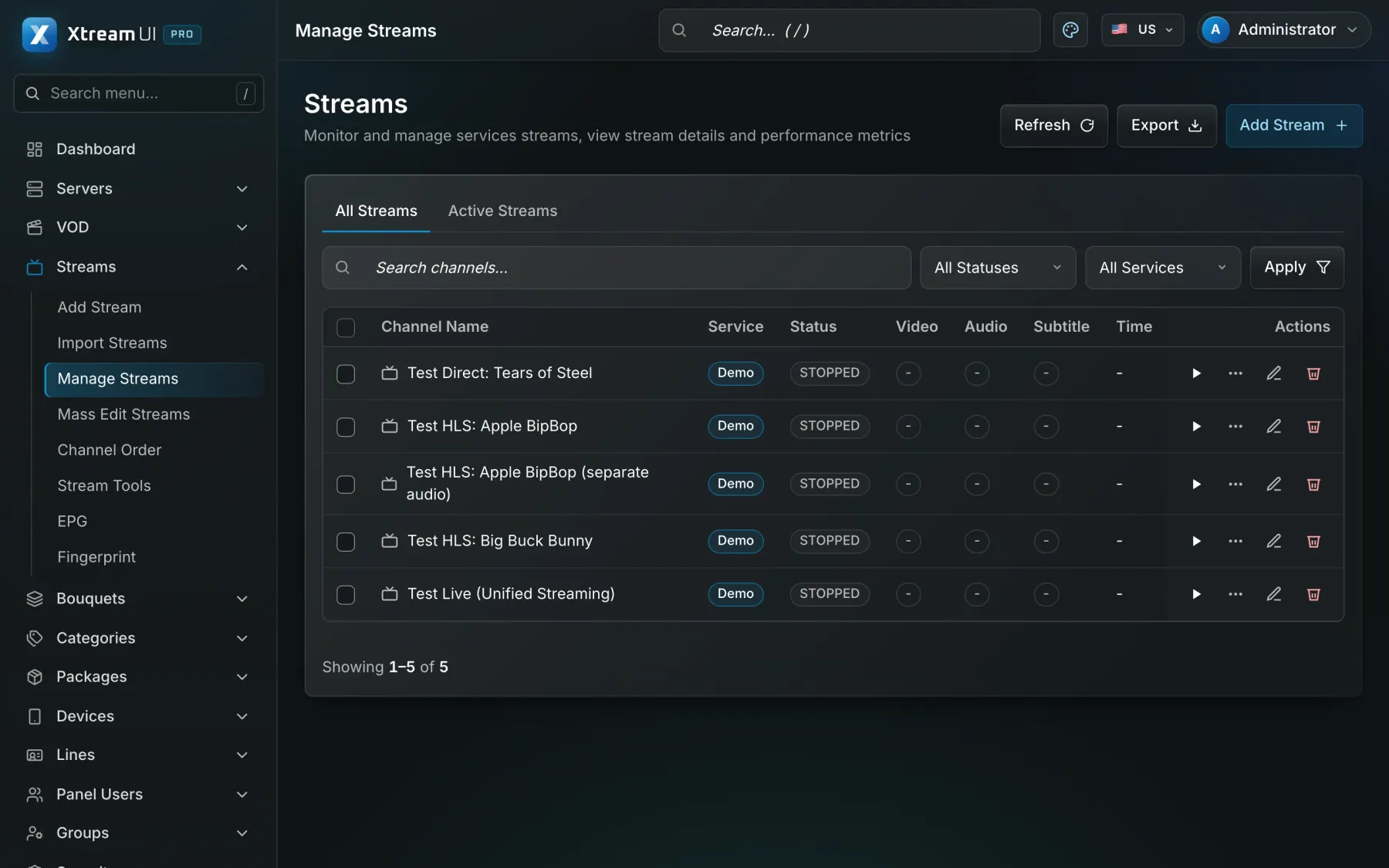
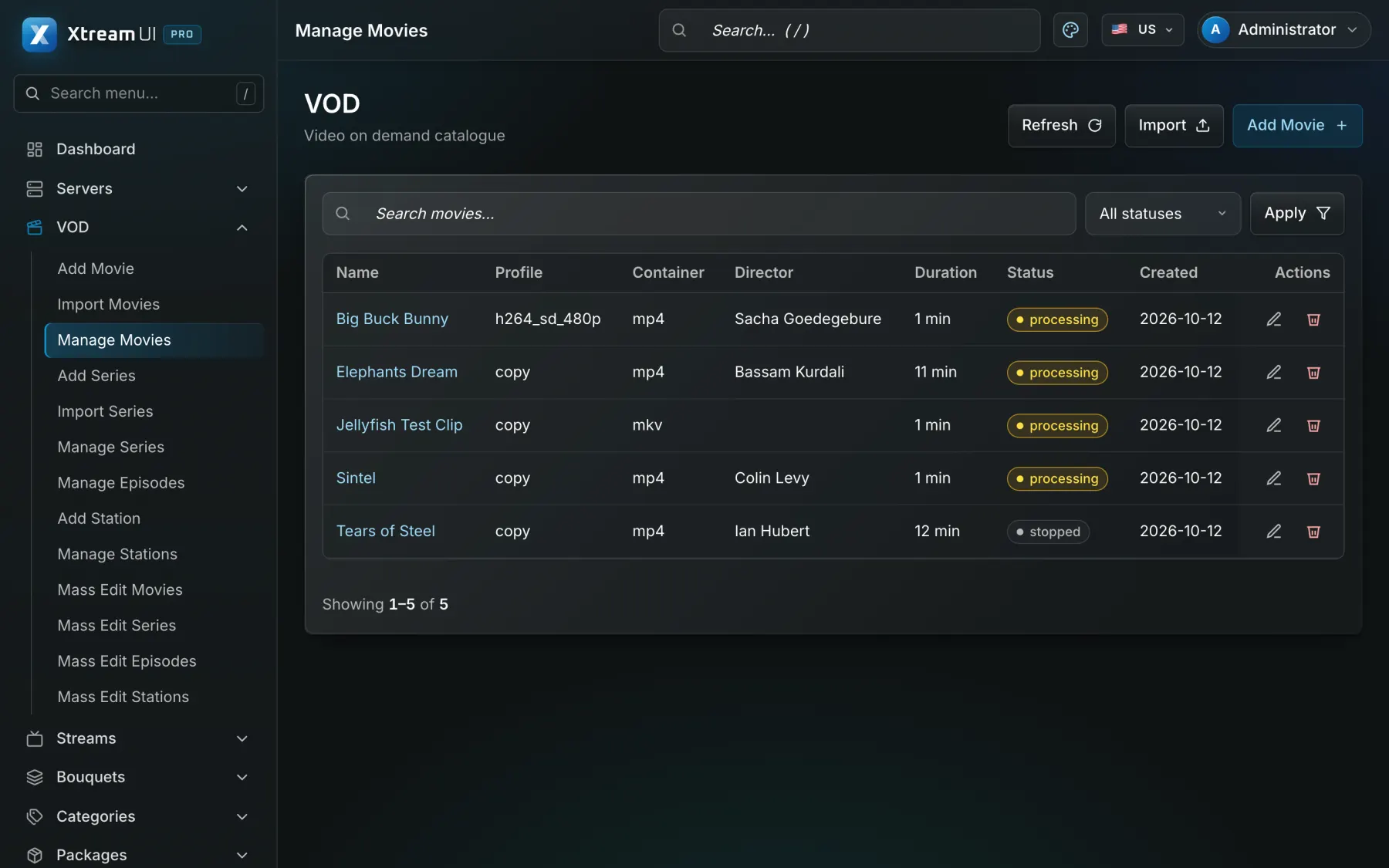
Screenshots of the dashboard of a fresh installation with the sample catalogue. Nothing is mocked up.

The Streams page of the dashboard: the live channels with their status, category, source and output formats.
Live streaming · Origin hub with one upstream per channel · RTMP in and out · ffmpeg transcoding
The Movies page of the dashboard: the films of the catalogue with their category, year and status.
Video on demand · Signed, time-limited playback links · per-node VOD cache

Infrastructure architecture

Example deployment: three apartment buildings

A management server at the management company, a node in each building, one line per apartment, and the property manager running the lines as a partner account.

Pick a part of the diagram to see what it does.

In a residential deployment the sources are the licensed channel feeds and the management company's own videos; the panel holds the line-up and the apartments' lines; a node per building serves its residents; a billing or housing system connects through the Reseller API and webhooks.

  1. Install and add the nodes

    The panel, the API, the worker and the origin run on one server; a node is enrolled from Servers for each of the three buildings and routes that building's residents to it.

  2. Build the line-up and the information channel

    Channels go into bouquets per package, and the management company's notices go out as an information channel included in every package.

  3. Open a line per apartment

    The property manager, a partner account with credits, creates a line per apartment under Lines with the package of that home and the lease end as its expiry.

  4. Renew and close

    A renewal adds the package's period; when a resident leaves, the line is disabled and the next resident receives new credentials.

Configuration mapping

Your concepts, the platform's objects

The platform has no industry-specific objects: a bouquet, a line, a package or a partner account is used as the concept your industry needs. These are conceptual mappings, not native features of that industry.

Step-by-step setup guide

Prerequisites, a node per building, channel line-ups, a line per apartment, the information channel, move-in and move-out, and troubleshooting, step by step.

Read the setup guide
In your industryOn the platform
Property manager accountPartner account (reseller): a delegated dashboard with credits, permissions and its own lines
Channel line-upBouquet: a named set of channels, films or series that a package grants
Channel or information channelLive channel: a stream with its sources, EPG and output formats
Welcome and notice videosVOD catalogue: movies and series with seasons and episodes, categories and metadata
Apartment accessLine: one access with its package, bouquets, expiry, connection limit and outputs
Lease or occupancy periodExpiry date of the line, renewed by a package, a credit or the API
Building nodeStreaming nodes: edge servers enrolled from the panel, one per site or building

Integration considerations

A housing or billing system that opens and closes access connects through the Reseller API (create, renew, enable and disable a line) and webhooks; a commerce platform with a ready connector can sell extra packages to residents. Encoders connect over RTMP. There is no native integration with a specific property-management product.

Security considerations

A connection limit per line keeps one home's credentials from serving a whole street; playback links are signed and expire; a line can be bound to an address; property managers see only their own homes; management accounts use two-factor sign-in, permission groups and the audit log.

Content rights and licensing

The community needs the rights to retransmit the channels it carries to its residents and to the videos it publishes; the platform supplies no content and no rights. Standard plans apply.

Content Rights & Acceptable Use

Help centre

Questions from this industry

The questions operators ask before a deployment. The help centre has the general ones.

Help centre
Can each building have its own channels?

Yes. Give the building's homes a package whose bouquets hold that building's line-up; a node per building serves them locally.

How do residents get access when they move in?

The property manager creates the apartment's line, or your housing system does it through the Reseller API, and the credentials are handed over with the keys.

What do residents watch with?

A set-top box, a smart TV with a player app that speaks the Xtream Codes API or M3U, MAG and Enigma2 boxes, or the web player in a browser. No custom app is required.